About Me

Simplifying information architecture

I led the redesign of the article pages within Brix, restructuring a cluttered layout so users could easily navigate machine learning code assets and find the information and actions they need.

Surface

Web app

My role

Design

Timeline

Q3 2023 – Q1 2025

Skills

Product Design, Design Systems, Responsive Design

The Challenge

Discovery worked. The page didn’t.

Search and thematic tags were getting people to the right asset. Once they arrived, user interviews told a different story: people couldn’t tell where to look or what to do next, so they spent less time with the content itself.

1

Information was scattered

Metrics were split between the side panel and the body.

2

Actions we're duplicated

‘Like’, ‘Get’ and ‘Versions’ each appeared in more than one place.

3

Too much at once

The page showed everything on the first visit, resulting in cognitive overwhelm and users not knowing where to go first.

Audit and review of the old UI

Solution

A floating menu that keeps every action in one place

A floating menu that keeps every action in one place

Previously, getting code meant hunting across the header, the sidebar and the body. A floating menu gathers the key actions (Get, Like, Comment and Share) into one fixed spot that follows you down the page, so the next step is always within reach.

I designed the menu as a reusable component and contributed it to the Brix design system and front-end codebase, so every article page now uses the same pattern.

Previously, getting code meant hunting across the header, the sidebar and the body. A floating menu gathers the key actions (Get, Like, Comment and Share) into one fixed spot that follows you down the page, so the next step is always within reach.

I designed the menu as a reusable component and contributed it to the Brix design system and front-end codebase, so every article page now uses the same pattern.

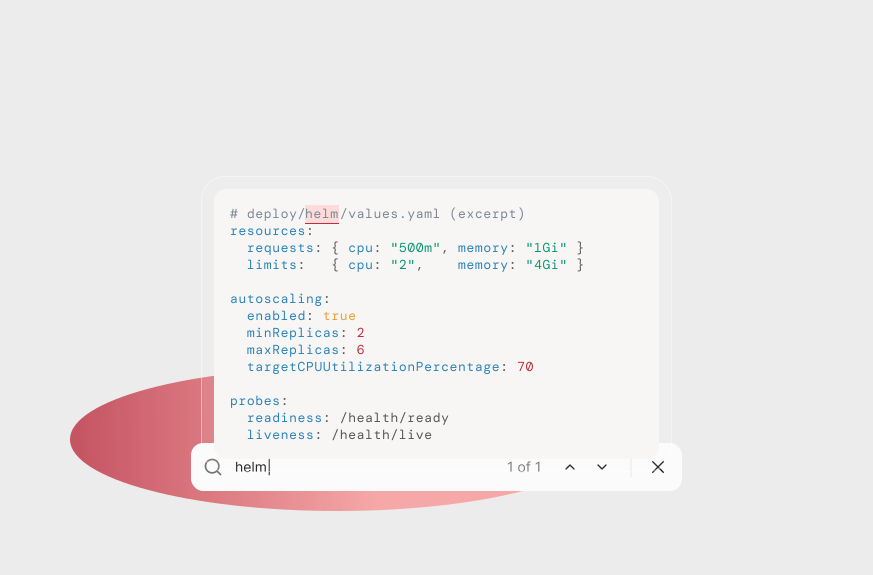
Search inside the article, not the browser

Search inside the article, not the browser

Session replays showed users reaching for Ctrl/Cmd + F again and again. They often arrived knowing exactly what they needed (a config key, a function name, an error message). But browser search wasn’t built for this. It searched the whole screen, so a term like ‘memory’ also matched the menus and side panels, leaving people to click through results that weren’t in the article.

Now readers can search within the article to jump to a specific section or detail, with each match highlighted in place.

Session replays showed users reaching for Ctrl/Cmd + F again and again. They often arrived knowing exactly what they needed (a config key, a function name, an error message). But browser search wasn’t built for this. It searched the whole screen, so a term like ‘memory’ also matched the menus and side panels, leaving people to click through results that weren’t in the article.

Now readers can search within the article to jump to a specific section or detail, with each match highlighted in place.

Bookmarks that let readers pick up where they left off

Bookmarks that let readers pick up where they left off

Analytics showed the average reading session lasted between 3-6 minutes. Two patterns explained why:

Analytics showed the average reading session lasted between 3-6 minutes. Two patterns explained why:

1

Reading in bursts

Users read a section, leave to try the code in their own environment, then came back

2

Dense content

Some posts run to several files and dozens of sections, too much for one sitting

Either way, coming back meant scrolling to find where they’d stopped. Now users can bookmark any paragraph, and ‘Jump to bookmark’ takes them straight back.

Either way, coming back meant scrolling to find where they’d stopped. Now users can bookmark any paragraph, and ‘Jump to bookmark’ takes them straight back.

Factoring in responsive design so articles work wherever users read them

Factoring in responsive design so articles work wherever users read them

The floating menu, contents panel and search adapt to smaller screens, so articles stay easy to navigate, whether they’re full-screen or open beside an editor.

The floating menu, contents panel and search adapt to smaller screens, so articles stay easy to navigate, whether they’re full-screen or open beside an editor.

Impact

A year on: more reading, more reuse, more contributions

+53%

asset consumption

Designed to make acting on content easier: Get is always within reach, and search takes people straight to the section they need.

+25%

monthly active users

Designed to support return visits: bookmarks let readers carry on where they stopped, instead of starting a long guide from the top.

+48%

code assets contributed

The outcome Brix exists for. Making assets easier to read and reuse was meant to encourage more people to share their own.

Learnings

Shipping my own components, not just handing over designs

Rather than handing specs to engineering, I built the floating menu component and contributed it through GitHub. Working in the code surfaced real constraints, such as state, edge cases and behaviour across every article, far earlier than a mockup would. Less was lost between design and production, and I now design in reusable components from the start.

Rather than handing specs to engineering, I built the floating menu component and contributed it through GitHub. Working in the code surfaced real constraints, such as state, edge cases and behaviour across every article, far earlier than a mockup would. Less was lost between design and production, and I now design in reusable components from the start.

Reflections

What i'd do differently:

Instrument each feature before launch

Tracking search, bookmark and menu events from day one would show what each one contributed.

Stage the rollout

Releasing features one at a time, or to a share of users first, would separate their impact from the wider platform growth

What i'd do next:

‘Continue reading’ on the homepage

Surface bookmarked articles where users start, so they don’t have to find the article first.

Run a follow-up usability study

Test the new page with the same tasks as the original research to measure the improvement directly.

NEXT PROJECT

Shipped

Reducing content discovery friction

How a filter redesign took first-try finds from 41% to 52%

Shipped

Reducing content discovery friction

How a filter redesign took first-try finds from 41% to 52%

Shipped

Reducing content discovery friction

How a filter redesign took first-try finds from 41% to 52%